Every box labelled, every box checked.
Your suppliers pack the delivery on the portal, print standard Odette labels on the printer they already have, and scan every box with a phone before the lorry leaves. Where you want it, a second scan reads the separate part barcode on each box, so the part inside is proved to match the label outside. Your system receives one standard message saying what was seen to leave. No web EDI portal, no per-supplier fees, no special printer.
Three costs you already know.
We will not guess your figures. Put your own numbers against these three.
Fees, and small suppliers who never join.
A web EDI service charges per supplier or per message, and the suppliers who need it most are the ones who will not pay. So the ASNs you most want are the ones you never get.
An industrial printer at every supplier.
A full-size transport label wants a 6-inch printer. Most small suppliers do not have one, so the label on the box is whatever their office printer made of it.
Found on your line, not at their dock.
Sorting, a line stop, a chargeback nobody can prove, because nobody can say what actually left the supplier, or how the pallet looked when it did.
Pack, print, scan, send.
Four steps the supplier does in the portal, each one checked before the next. The screens are on the demo, and we walk them on the call.
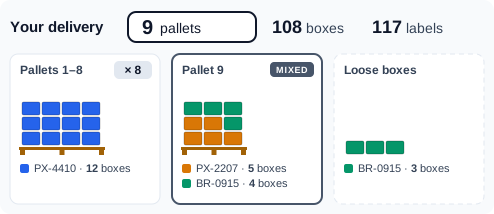
The delivery, drawn
Each part in its own colour, the pallets drawn with their boxes, and the pallet count in large type for the forklift and the lorry. Several parts can share a pallet; thirty identical pallets are one picture with a count.
Standard labels, any printer
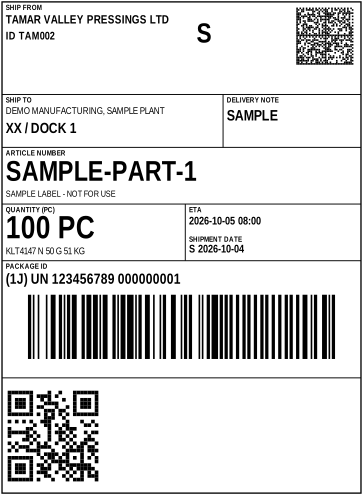
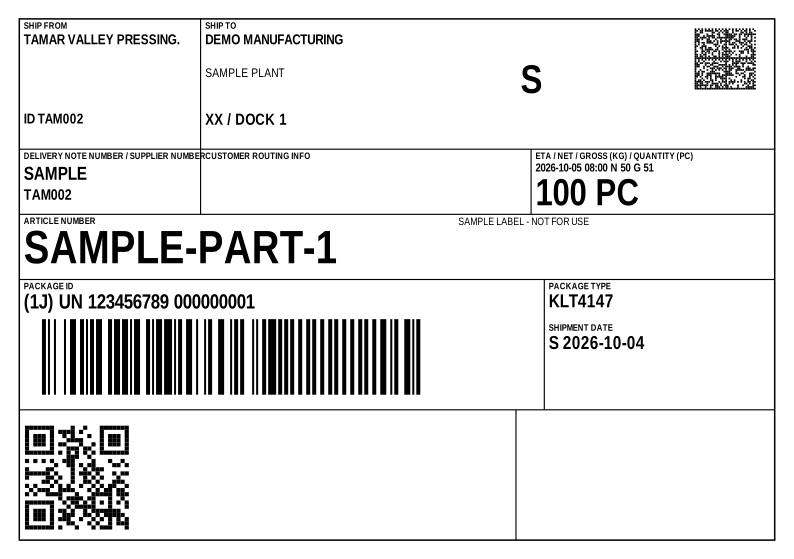
The Odette transport label, two to an A4 sheet, or the compact A6 label to the same ISO standard, four to a sheet or one at a time on a 4-inch label printer through its normal driver. Nothing to install.
Every box, with a phone
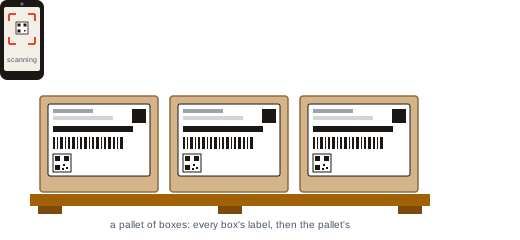
The phone opens from a code on the screen: no app, no sign-in. It reads each label, one pallet at a time, says what is left on the pallet in hand, and asks for a photo of each pallet when it is complete. Where you switch it on, it then reads each box's own part barcode, and the box only ticks when the part matches its label.
A slot, and the message
Only days your site can take a delivery are offered. Send books the slot and writes one message to your system, with every box, its serial and its batch, and when the check was done.
The screens, from the demo.
Real pages from the demo site, a supplier sending ten boxes on two pallets.
Two pallets, ten boxes, twelve labels.
The supplier says how the part is packed; the delivery is drawn above, with the pallet count first. Every change saves itself, and Undo takes one back.

Every label, before it is printed.
Each label is drawn on the screen and listed with its package ID. One Print button; the paper is chosen once and remembered.

Ticking off as the phone sees them.
The Verify screen shows the supplier how to scan, and every label ticks a moment after the phone reads it, with the time and who scanned it. The pallet in hand is marked, with what is left on it.

Proof of what left, before it arrives.
The Odette standard, checked.
Code 128, Data Matrix and a QR on every label, to the Odette transport label standard. Every barcode is read back in our own tests before a release goes out.
A second scan: the part matches the label.
For a supplier with a mislabelling history, switch on the part-label check: after each transport label the phone reads the separate barcode on the box's own part label, and the box only ticks when the part, and the quantity where it is given, match. A mismatch is recorded, and the box stays unticked until it is put right.
Each pallet, with its time and place.
A screen can be scanned; a pallet cannot be faked. Each photo is kept with the time and where the phone was, so a crushed pallet has a history. Where you require it, nothing is sent until every label is scanned.
Nothing you do not ask for.
One documented message, the same for every customer: JSON, or CSV as a header and a lines file, with everything a DESADV carries. It waits at a pick-up point or goes to your SFTP; your translator maps it once. Suppliers who already send you EDI carry on as they are. There is no per-customer variant to maintain, and no network fee from us.
A phone, a printer and a free number.
Any printer, the phone in their pocket, and a DUNS number, which is free. No subscription, no app, no scanner. Every screen says what to do next, in short words.
Verified despatch is new in autumn 2026 and is on the demo site in full. It has not yet been in daily use at a customer's goods-in.
See it with your own supply base.
A demo takes forty minutes. Bring a real supplier problem and we will walk it from the concern to the closed 8D, and show you the order book as your suppliers would see it.